Yandex Go: Taxi Food Delivery
- 4.8
- Rating
- 100.00M
- Installs
- Free
- Price

 Analysis by App-foxy
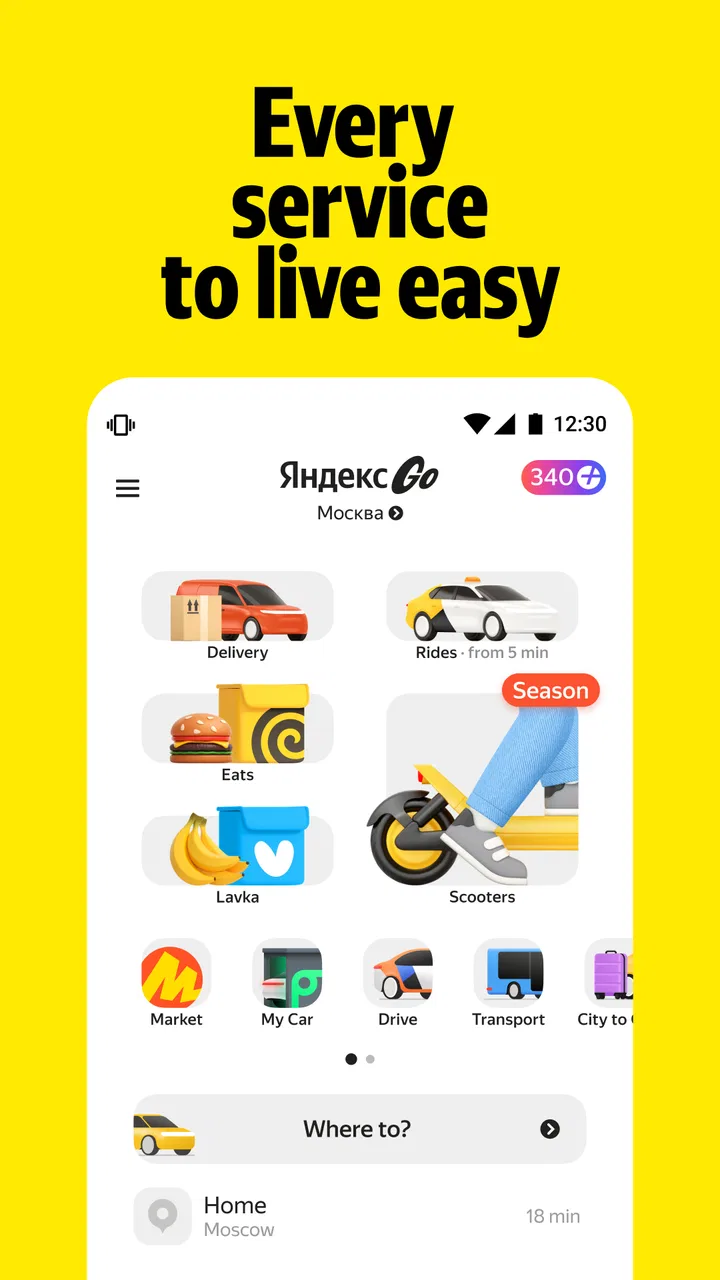
I reach for Yandex Go when I need to coordinate a short trip, arrange a ride for someone else, or handle a delivery without switching between several unrelated services. It sits in the maps and navigation part of my phone, but in daily use it feels more like a practical transport-and-delivery hub. The main appeal is not that it tries to do everything; it is that car rides, scooter rides, food delivery, and item delivery can be handled from one familiar place.
That convenience depends heavily on connectivity. A ride request, a changing pickup point, a courier update, and a delivery estimate all need current information. When the connection is stable, the experience is straightforward. When the signal becomes weak at exactly the wrong moment, the app can feel less forgiving than a simple map or a phone call. That contrast shaped my experience more than any individual screen or button.
How Yandex Go fits into everyday movement
Yandex Go is a free app from Mikromobilnost LLC Belgrade, available for Everyone and running on devices with at least OS 9. It has been around since October 25, 2011, and its current version is 5.79.0. Those details matter mainly because this is not a niche experiment: the app has grown into a widely used service, with over 100 million installs and an average rating of 4.7 from around 14 million ratings.
In-Depth Coverage of Yandex Go: Taxi Food Delivery
I would describe its strongest use case as reducing small decisions during a busy day. Instead of figuring out a taxi number, searching separately for a meal, and arranging a courier for an item, I can start with the kind of help I need and continue from there. That does not make every request cheaper or faster than the usual alternative, but it does make the process more consistent.
The app is especially useful in cities where its transport and delivery coverage is familiar to local users. A visitor may appreciate having one interface for several needs, while a regular resident may value the saved addresses and repeated routines that gradually make requests quicker. I would not choose it solely because it belongs to a large service ecosystem, though. The real question is whether the service around me is dependable and whether my mobile connection is good enough for the task.
Rides are easiest when the pickup is unambiguous
For a normal car ride, the most important part of the workflow happens before the vehicle moves: choosing the correct pickup location. In a crowded street, a shopping complex, a hospital entrance, or a large apartment block, the map pin can be technically correct while still being inconvenient for the driver. I have found that taking a moment to check the entrance and nearby landmarks is more useful than rushing through the request.
This is also where connectivity changes the experience. With a strong connection, I can adjust the location, watch the request progress, and react if the driver needs clarification. In a poor-signal area, every change feels slower and uncertainty increases. I recommend setting the pickup point while standing somewhere with reliable reception, then moving only after the request is properly established.
That small habit is one of the app's less obvious strengths: it encourages a complete, map-based handoff rather than leaving the entire arrangement to a vague street address. It is not a replacement for common sense, however. If I am at a stadium, station, or event venue, I still need to describe where I actually am and remain visible to the driver.
Scooters make the phone part of the journey
Scooter rides create a different relationship with the app. A car request is mostly about arranging a pickup and then waiting. A scooter journey involves the phone more directly, because the starting point, route, and end point all matter while I am moving through the city. That makes screen visibility, battery level, and a dependable connection more important than they are for a short taxi wait.
I would use this option for a practical urban trip where flexibility matters, rather than assuming it will always beat walking or public transport. A scooter can be convenient for covering a gap between two destinations, but it is not automatically the best choice in bad weather, on unfamiliar roads, or when I am carrying something awkward. The app can organize the ride; it cannot remove the physical limitations of the route.
My useful rule is to plan the destination before starting rather than repeatedly checking the phone during the ride. This reduces distraction and makes connectivity interruptions less disruptive. If the route depends on constant live updates, I would rather choose a transport option that lets me keep the phone away and concentrate on traffic.
Food and item delivery are about timing, not just ordering
The delivery side is valuable when I need something brought to me instead of going out. Food delivery suits evenings, work breaks, and situations where leaving the location is inconvenient. Item delivery is more useful for sending something across town or moving a needed object without arranging the trip myself. The shared interface makes both tasks feel related, but the practical concerns are different.
For food, I pay attention to the delivery address and any access detail before confirming. A courier may reach the building but still lose time at a locked entrance, office reception, or confusing courtyard. For an item, I think more carefully about whether the sender and recipient will both be available. A delivery request is not finished when it leaves my screen; the handoff still needs a realistic plan.
You May Also Like

 Lords Mobile: Kingdom Wars
Lords Mobile Is a Kingdom-Building Routine, Not a Quick Match
A case-by-case verdict on the building, battles, device demands, and social commitments that make Lords Mobile rewarding for some players and exhausting for others.

 PDF Scanner app - TapScanner
TapScanner Makes Paperwork Easier to Capture, Check, and Share
TapScanner makes scanning with a phone feel less like a rescue operation and more like a dependable step in getting work done. Its capture tools are useful, though not flawless.

 Block Blast!
Block Blast! Shows How Much a Puzzle Game Can Leave Out
A quiet grid game shows why puzzle players increasingly value instant clarity, repeatable skill and low-pressure play—and where the genre still needs to catch up.

 Family Space
Family Space Review: A Shared Routine That Makes Family Life Easier
A parenting app earns its place not by adding more noise, but by making everyday coordination easier. Family Space gets that balance mostly right.

 1Weather Forecasts & Radar
1Weather Forecasts & Radar Makes the Daily Check Worthwhile
A good forecast does more than predict rain. This week's pick turns changing conditions into a clear, practical reason to check before you step outside.

 Clash of Clans
Clash of Clans Makes Patience Part of the Strategy
A village builder with a sharp tactical core, Clash of Clans turns patience into momentum and each raid into a small, satisfying act of judgment.
More From Our News Desk
View All News


Connectivity is particularly noticeable after the order is placed. Updates are useful only when they arrive in time to change what I do. If I am away from the phone, a delayed status can be more frustrating than no status at all because I may miss the moment when a courier needs a response. I therefore avoid placing time-sensitive orders while entering a tunnel, boarding transport, or moving into a building with unreliable reception.
What happens when the network is the weak point
I’ve found that a weak connection changes more than how quickly a screen loads: it can make it unclear whether a ride or delivery request has actually gone through. In this section, I focus on how I distinguish a delayed update from a stalled workflow and what I prepare before moving into an area with poor reception. The goal is to make the handoff easier to manage, even when live information is unreliable.
Recognizing the difference between a delay and a failed request
One of the most important practical lessons is not to tap repeatedly when the connection is unstable. A request that appears frozen may still be processing, and repeated attempts can create confusion about what was actually submitted. I wait for the screen to respond, check the current state, and only then decide whether another action is necessary.
This matters more for rides and deliveries than for browsing. A slow restaurant list is annoying; an unclear transport request can affect where I stand, whom I meet, and how long I wait. Before confirming anything important, I prefer to make sure the phone has a usable signal and that the location shown on screen is sensible.
If the connection drops after a request has begun, I treat the app as temporarily unable to show the full picture rather than assuming the request disappeared. I avoid walking far from the pickup point until I know what is happening. If I need to contact the driver or courier, I prepare a short, precise message with the entrance or landmark, because concise information is easier to send and understand when the connection is intermittent.
Recovery requires a little preparation
The best recovery strategy is simple preparation before the weak-signal moment. I check the destination, pickup point, and any access instructions while connected. For a journey, I also make sure the phone has enough battery for navigation and communication. These are ordinary habits, but they have a larger effect here because the app coordinates several moving parts at once.
I also avoid starting a complicated delivery request from a place where I cannot easily verify details. A busy underground station, a basement, or a crowded high-rise lobby may be a poor place to enter an address or wait for a status change. Moving to a clearer area first often saves more time than trying to force the app to work through a weak signal.
There is a trade-off here. The app gives me more live coordination than a traditional phone-based arrangement, but that advantage is tied to current communication. If I regularly travel through areas with unreliable coverage, I would keep a simpler backup plan in mind: know the destination, know the pickup landmark, and do not depend on a last-second change that requires a perfect connection.
A realistic mobile scenario
Imagine leaving work late with a low battery and an uncertain connection. I need a ride from a large office complex, and I also want dinner delivered to my apartment. The efficient approach is to arrange the ride first while I still have a stable signal, choose a pickup point at a recognizable entrance, and then place the food order only after checking that the home address and access information are correct.
If I reverse that order and walk outside before confirming the ride, I may lose reception among tall buildings and spend the next few minutes unsure whether the driver is coming. If I order dinner while rushing between buildings, I may also miss a courier message. The app can handle both tasks, but my sequence determines whether the experience feels calm or chaotic.
This is where Yandex Go feels most useful to me: not as an automatic solution to every travel problem, but as a tool that rewards a sensible workflow. I decide the location first, use the strongest available connection for confirmation, and keep the phone accessible until the handoff is clear.
Using it without wasting mobile data
I would not call Yandex Go especially difficult to use on a mobile connection, but transport and delivery naturally involve maps, status changes, and live communication. If data use matters, I avoid browsing aimlessly through options and decide the basic destination before opening the relevant service. I also use a reliable Wi-Fi connection for app updates and general preparation when one is available, while keeping mobile data for the actual request.
Another useful habit is to avoid repeatedly reopening screens just to watch for movement. A request needs attention at key moments: confirming the address, checking the pickup, responding to a message, and completing the handoff. Constantly refreshing does not make a vehicle or courier arrive sooner, and it can make a weak connection feel even more frustrating.
Battery conservation is part of data-conscious use too. A phone that reaches a low-power state at the pickup point is not useful even if the request itself was successful. I lower unnecessary screen time, keep the device available for essential communication, and do not start a scooter trip when I know I may need the phone for navigation but have little battery remaining.
Where alternatives can be better
Yandex Go is not automatically superior to every alternative. A dedicated public-transport app may be better when I need detailed route planning, transfers, or timetable information. A local taxi company may be preferable if I already trust its phone dispatch in an area with weak internet. A restaurant's own delivery channel may make more sense when I am loyal to one venue and do not need a broader marketplace.
For walking and cycling, a navigation app built around route detail can offer a more focused experience than a service centered on rides and deliveries. For a long journey, I may prefer rail or bus planning rather than booking a car. The advantage of Yandex Go appears when I want a quick, coordinated action and appreciate having several urban services together, not when I need the deepest specialist information for one transport mode.
I would also skip it for a mission that requires guaranteed human confirmation before anything happens. The app is convenient for digital coordination, but a direct conversation can be clearer when the pickup is unusual, the item is sensitive, or the timing is critical. In those cases, I value certainty more than the convenience of staying inside one interface.
Who will get the most from it
I think it suits people who move around cities often and want one familiar place for car rides, scooters, food, and item delivery. It is also helpful for users who regularly send something to another address or need to arrange transport while multitasking. The free price makes trying it low-risk, and the Everyone age rating keeps the audience broad.
It is less suitable for someone who rarely uses app-based services, has unreliable connectivity most of the time, or prefers to settle every detail by phone. New users should not assume that a map pin communicates every practical detail. The first successful trip may take a little attention, especially around entrances, building access, and meeting points.
After using it across these different situations, my opinion is positive but conditional. The broad service range is genuinely useful, and the interface can reduce the friction of everyday urban errands. Its weak point is not a lack of ambition; it is the dependence on timely location and communication updates. When my connection is good and I prepare the handoff properly, Yandex Go feels efficient. When I am in a dead zone or rushing without checking details, the same convenience can turn into uncertainty.
My final recommendation is to install it if you want a flexible city companion rather than a pure navigation tool. Use it for rides, scooters, food, or item delivery when the network is dependable, confirm locations before moving away from them, and keep a simple backup plan for important journeys. The best experience comes from treating connectivity as part of the trip, not as an invisible background detail.
With its current version, 5.79.0, and its long presence in the category, the app feels mature enough for regular use while still requiring ordinary judgment from the person holding the phone. I would recommend it to a friend who wants convenience across several city services, but I would also tell that friend not to confuse a smooth digital request with a guaranteed smooth handoff. That small distinction is what makes the difference between merely having the app and using it well.
FAQs for Yandex Go: Taxi Food Delivery
01What services does Yandex Go offer?
Yandex Go provides a variety of services including taxi rides, food delivery, and grocery shopping. Users can easily access these services through a user-friendly interface, allowing for quick and efficient bookings. The app aims to offer convenience by combining multiple services into a single platform.
02Is Yandex Go available in my area?
Yandex Go operates in several countries, primarily in Russia and surrounding regions. It's essential to check the app store or the Yandex Go website to confirm availability in your specific location. The app continuously expands its service areas, so availability may improve over time.
03How do I ensure the safety of my rides with Yandex Go?
Yandex Go prioritizes user safety by providing features such as driver ratings, trip tracking, and the ability to share ride details with friends or family. Additionally, all drivers must pass a rigorous screening process to ensure passenger security. Users can also contact support for any concerns.
04What payment methods does Yandex Go accept?
Yandex Go supports various payment methods, including credit and debit cards, as well as cash in some regions. Users can easily add and manage their preferred payment options within the app, ensuring a seamless transaction process for both rides and food deliveries.
05How does Yandex Go handle customer support?
Yandex Go offers customer support through multiple channels, including in-app chat, email, and phone support. The app provides a help section with detailed FAQs and guides for common issues. Response times are typically quick, ensuring users receive timely assistance with their inquiries.
Pros
- Wide availability across multiple cities.
- User-friendly and intuitive interface.
- Multiple payment options available.
- Real-time GPS tracking for safety.
- Option to schedule rides in advance.
Cons
- Limited customer support response time.
- Occasional app crashes reported.
- Surge pricing can be high.
- Limited promotions for new users.
- Some regions have fewer driver options.

Yandex Go: Taxi Food Delivery
Gallery